

This checklist is for adults who want to organize charging gear for their vape devices and make more deliberate choices about cables, adapters, and portable power. Focus on the connection your device uses and the charging instructions that came with it. Compatibility comes first; a product name alone does not establish that a charger is appropriate for a particular device.
The sections cover a USB-C charger, charging dock, cable, wall adapter, portable power bank, and battery case. Some slots include a named pick, while the dock and cable sections offer selection advice. Each slot has a different job, from providing a connection to carrying or storing gear.
Use the checklist by confirming your device’s connector and manufacturer guidance before buying, then compare the listed features with your setup. Treat the named products as candidates to investigate, not as verified compatible accessories. Check the device instructions and product details before use, especially when choosing charging equipment or storage for batteries.
USB-C Vape Charger
A multi-port charger can help organize several devices or accessories around one outlet, but the listed product’s name does not confirm compatibility with a vape. Check the device maker’s charging guidance and the charger’s output information before connecting anything. Port count is not compatibility: the device’s requirements and the charger’s specifications both matter.
A common mistake is choosing a charger because it has many ports or a large wattage figure, without checking which ports provide which output or whether the included cables match the device. Confirm the connector at the device end, review the charger’s supported output, and use only a charging method allowed by the device manufacturer. The product name mentions four cables, but does not identify their connector types. Verify every connection rather than assuming the included leads fit.
Consider whether the block’s size and number of ports suit the place where it will be used, and leave the setup accessible so you can monitor it. Avoid treating a general-purpose charging station as a substitute for device-specific instructions. Follow the maker’s guidance for charging and supervision.
What to look for:
- Confirm the device maker permits this kind of USB-C charging.
- Check the charger’s port-by-port output specifications.
- Verify the included cable connector types and device-end fit.
- Choose a location where the charging setup can be monitored.
- Follow the device maker’s charging and supervision guidance.
USB-C Charging Station 10 Port with 4 Cables, 245W GaN Charger Block

This 10-in-1 charging station features multiple USB-C and USB-A ports, supporting fast and safe charging for a variety of devices including laptops, tablets, and smartphones. It offers a total output of 245W, with safety protections against overcharging and overheating, and is portable for travel use.
Pros:
- Supports multiple devices simultaneously with high total power output
- Universal compatibility with various devices including laptops and smartphones
- Compact and portable design suitable for travel
Cons:
- Instruction manual may be printed incorrectly
- First port only supports laptops, limiting some device charging
- Complex specifications may be overwhelming for casual users
Best for: People organizing multiple compatible charging connections
Not ideal for: Devices whose charging requirements are not confirmed for this charger
Bottom line: Check the device and charger specifications together before using this multi-port station.
Vape Charging Dock
A charging dock can give a device a consistent place to sit, but the word “dock” does not guarantee that it supports a particular vape model. Start with the device’s instructions and look for a dock that explicitly names the compatible model or connection. Model fit matters; a device that rests in a cradle may still lack a suitable electrical connection.
A frequent buying mistake is prioritizing a neat appearance or a snug-looking holder over verified electrical compatibility. Check how the device connects, whether the dock is designed for that exact model, and whether the manufacturer permits dock charging. Avoid modifying connectors or forcing a device into a cradle that does not fit naturally. Never force the fit or rely on appearance alone to judge compatibility.
Think about the device’s shape and how it will be placed in the dock, along with the location where you plan to use it. Keep the charging area clear and follow the device maker’s instructions for charging and supervision. If the product listing does not clearly identify supported devices and charging details, contact the manufacturer or choose a clearly documented option. Clear compatibility details make the choice easier to assess.
What to look for:
- Explicit compatibility with the exact device model.
- A connector and charging method approved by the device maker.
- A cradle shape that fits without pressure or modification.
- Clear instructions for setup, charging, and supervision.
- Manufacturer support when compatibility details are unclear.
Vape Charging Cable
A cable needs to match both the charging source and the device, and the connector shape alone may not tell the whole story. Check the device instructions for the permitted cable type and charging method, then compare both ends of the cable with your setup. Match both ends before making a purchase.
A common mistake is assuming that any cable with a familiar connector will work, or choosing one based only on length. Listings may not make clear what charging capability a cable supports, and a cable bundled with another product may have connectors that do not fit your device. Review the product specifications and ask the seller or manufacturer if an important detail is missing. Read the cable details instead of relying on a product title.
Choose a length that reaches your planned charging location without pulling the device or leaving excess cable where it can snag. Inspect the cable and connectors for damage, and follow the device maker’s guidance about charging. A replacement cable should be documented for the intended use; when that cannot be confirmed, check with the manufacturer first. Use an undamaged cable and keep the setup orderly.
What to look for:
- Connector type at both the power-source and device ends.
- Charging capability that matches device instructions.
- Product details identifying the cable’s intended use.
- A practical length that does not pull or snag.
- Undamaged connectors and cable insulation.
USB Wall Adapter
The listed pick is named “USB-C and USB-A Data Blocker Adapters, 3-Pack.” Its name describes data-blocking adapters, so do not assume these are wall chargers or that they provide power on their own. Confirm the product’s function and whether it suits the charging arrangement you have in mind.
A common buying mistake is confusing a data blocker with a power adapter. Check the listing for exactly what is included, how each adapter connects, and whether it is intended to pass power for your use. Then verify compatibility with the charger, cable, and device instructions. The product name alone does not establish its power behavior or suitability for charging a vape. Verify power pass-through in the product documentation before use.
For fit, check whether the adapter’s connectors match the ports in your setup and whether adding it changes the connection arrangement. Keep the manufacturer’s recommended charging method as the guide, and avoid using an accessory when its function is unclear. If you need a wall power source, confirm that the selected item is actually a wall adapter with documented output details. Check the complete setup, including the source, adapter, cable, and device.
What to look for:
- Whether the item is a data blocker or a power adapter.
- Documentation confirming power pass-through for the intended use.
- Connector types that match the existing charging setup.
- Output details for any wall charger used with it.
- Compatibility with the device maker’s charging instructions.
USB-C and USB-A Data Blocker Adapters, 3-Pack
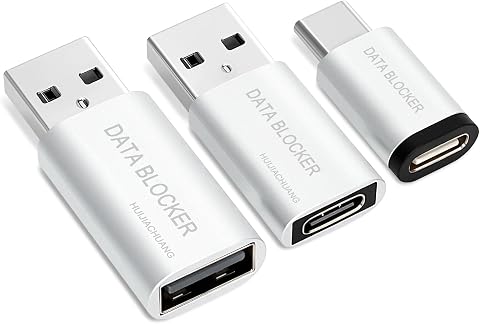
This set includes three USB-C and USB-A adapters designed to block data transfer while charging, helping protect devices from unauthorized access at public charging ports. The USB-C to USB-C adapter supports up to 100W (20V/5A), while the USB-A adapters support charging up to 2.4A.
Pros:
- Blocks data transfer during charging
- Supports up to 100W charging over USB-C
- Compact and portable
- Includes both USB-C and USB-A adapters
Cons:
- USB-A adapters are limited to 2.4A charging
- Does not support data transfer
Best for: People who need documented data-blocking adapters
Not ideal for: Anyone expecting a wall charger based on the section title
Bottom line: Confirm what this adapter does and whether it passes suitable power before relying on it.
Portable Power Bank
The listed pick is the “Jackery Explorer 300 Portable Power Station, 292Wh.” Its product name identifies it as a portable power station, but does not say which outputs or charging methods are appropriate for a vape. Check output compatibility against the device maker’s instructions before considering it as a power source.
A common mistake is treating a capacity figure as proof that a product will work with a particular device. Review the station’s available outputs and their specifications, then compare them with the device’s permitted charging method and the cable or adapter required. Do not connect a vape unless the manufacturer’s guidance supports the complete setup. Capacity does not establish fit; the output and charging instructions matter too.
Consider the station’s size and how you plan to transport and position it, using the product details rather than assumptions based on its name. Keep the setup stable and follow both product makers’ instructions. If the power station documentation does not clearly establish that the output is suitable for the device, contact the manufacturers or select a power source specifically documented for that use. Confirm before connecting, especially with portable equipment.
What to look for:
- Outputs and specifications documented for the power station.
- A charging method allowed by the vape manufacturer.
- A cable or adapter confirmed for both ends of the setup.
- Product instructions for transport and placement.
- Manufacturer confirmation when output suitability is unclear.
Jackery Explorer 300 Portable Power Station, 292Wh

This compact 7.1-pound power station has a 292Wh LiFePO4 battery, 300W rated output, and ports for charging up to six devices. It supports solar charging and includes an AC adapter and car charger cable; solar panels are sold separately.
Pros:
- Portable, compact design with an integrated handle
- Multiple output ports for charging up to six devices
- LiFePO4 battery rated for over 4,000 charge cycles
- Supports solar charging
Cons:
- Solar panel is sold separately
- 300W rated output limits the appliances it can power
Best for: People needing portable power for documented compatible devices
Not ideal for: Anyone without confirmed output compatibility for their vape
Bottom line: Check the power station’s output against the device instructions before connecting.
Vape Battery Case
The listed pick is named “Vape Mod Carrying Bag with Straps – Vapor Case for Box Mod, Tank, E‑ju.” The name suggests a carrying bag, but it does not establish that the case is designed for loose batteries or that it provides battery protection. Confirm the storage purpose before using it for any battery.
A common mistake is assuming that a bag intended for a mod and tank is also a suitable battery case. Look for clear manufacturer information about what the bag is designed to hold, how the contents are secured, and whether batteries should be stored separately in protective cases. Follow battery and device makers’ storage and transport instructions. Keep battery guidance specific to the battery type and device.
For fit, compare the interior dimensions and layout with the items you plan to carry, and check whether straps or compartments keep them from shifting. Do not carry loose batteries where they could contact metal objects or other items that could damage them; use storage recommended by the battery maker. If the listing does not clearly describe battery storage, treat the bag as a carrying case only and choose battery protection based on manufacturer guidance. Prevent contact and damage during storage and transport.
What to look for:
- Clear description of whether the bag is for devices, batteries, or both.
- Interior dimensions and compartment layout for intended contents.
- Secure storage that limits shifting during transport.
- Battery maker guidance on separate protective storage.
- Materials and construction details relevant to carrying the intended items.
Vape Mod Carrying Bag with Straps – Vapor Case for Box Mod, Tank, E‑juice, and B

The Wick and Wire portable vape organizer features a strong nylon exterior with reinforced stitching and a belt loop that can be clipped to a backpack or belt using the included carabiner. A heavy Velcro flap provides secure closure while allowing easy access to your vape accessories.
Pros:
- Portable with carabiner for belt or backpack attachment
- Durable nylon material and reinforced stitching protect hardware
- Secure Velcro flap provides easy access while keeping items safe
Cons:
- Limited storage capacity – only one pocket/compartment
- May be too small for larger vape accessories
Best for: People carrying a box mod and tank after checking dimensions
Not ideal for: Anyone seeking confirmed loose-battery protection from the name alone
Bottom line: Treat it as a device bag unless the maker specifically documents battery-safe storage.
Build the setup in a practical order: first confirm the device’s charging requirements, then choose a compatible cable and power source, and only afterward consider organizers, docks, or portable power. For storage, follow the battery maker’s guidance and choose a case whose stated purpose fits what you will carry. Start with compatibility and add convenience once the basics are clear.
Take time to compare product documentation with your device instructions, and contact the manufacturers when a key detail is missing. That small check can help you choose gear that fits your setup and is easier to use with confidence. A clear match makes shopping simpler; use this list as a starting point and confirm each item before use.